Learn 6502 now runs on Linux, macOS, Windows and Android
I'm happy to say that since version 0.9.0, Learn 6502 Assembly runs on Linux, macOS, Windows and Android 🐧🍏🪟🤖. Learn 6502 already ran on a phone before, by the way: on my OnePlus 6T with postmarketOS, as a regular GNOME app. What's new is that it now runs on Android too.
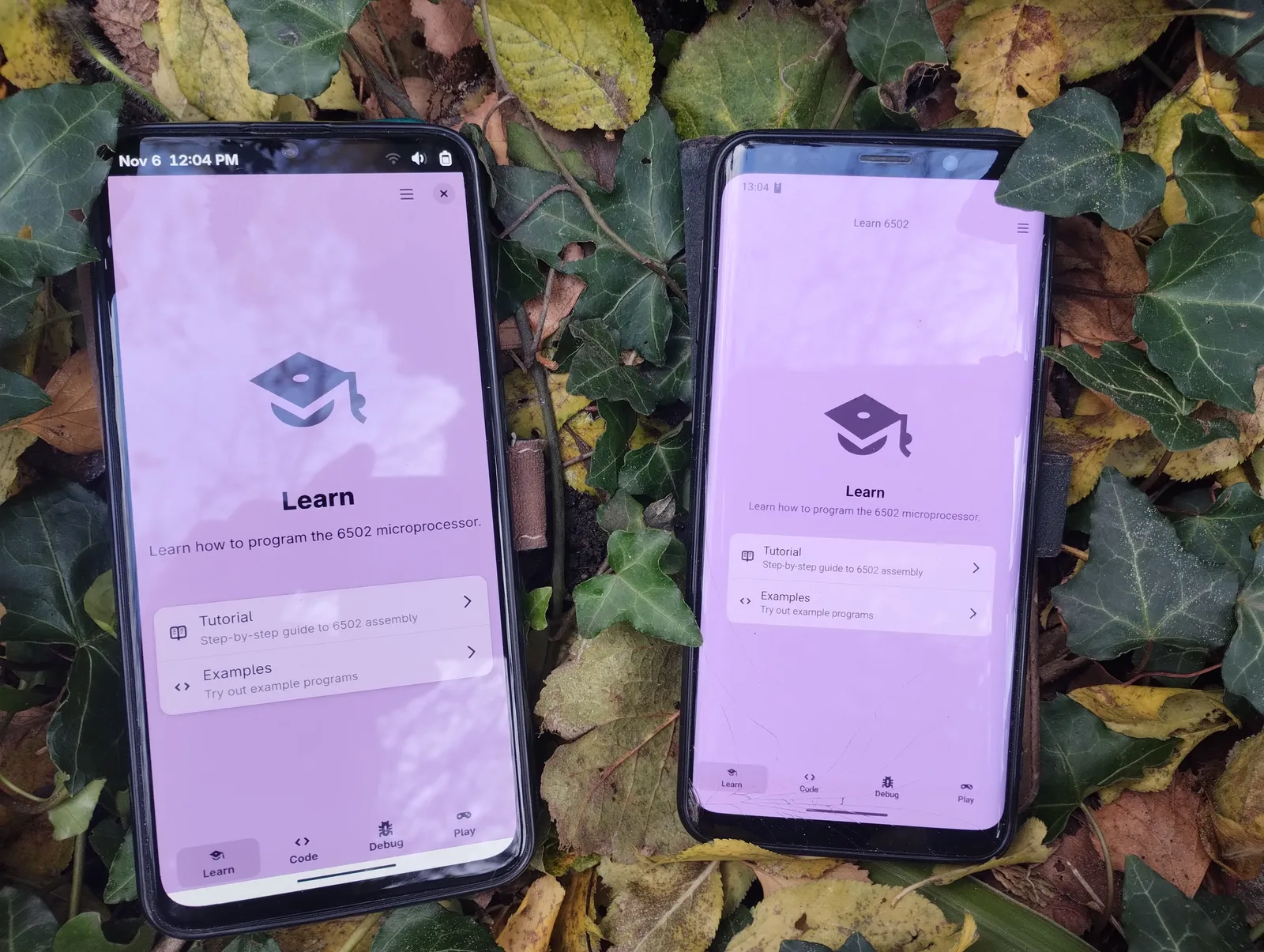
All downloads are on the app page. On Linux, Flathub is still the recommended way. What the app does is in the first post. This one is about how a GNOME app gets onto four systems without me maintaining four apps.
One codebase, four systems
Learn 6502 is written in TypeScript, the interface in Blueprint for GTK 4 and libadwaita. That code runs everywhere, just on a different runtime each time:
| System | Runtime | GTK and Adwaita come from |
|---|---|---|
| Linux | GJS | the GNOME runtime in the Flatpak |
| macOS, Windows | Node.js | @gjsify/node-gi and a bundled GTK runtime |
| Android | NativeScript | @gjsify/adwaita-nativescript, real Android views styled like Adwaita |
On Linux, Learn 6502 is a regular GJS app. For macOS and Windows I rebuilt the GJS runtime environment for Node.js. @gjsify/node-gi loads gi:// namespaces like GLib, Gtk and Adw in Node.js and behaves like GJS while doing it. It started from node-gtk and is now largely rewritten. So that I can rely on "behaves like GJS", the same tests run on both runtimes.
Android has no GTK. There the app runs in NativeScript, and @gjsify/adwaita-nativescript builds native Android views from the same Blueprint files, styled like libadwaita. No WebView involved. GLib and GObject come through node-gi here too.
That said, "no GTK on Android" isn't quite true anymore. Florian "sp1rit" is working on an Android backend for GTK, and GeopJr publishes unofficial test builds of GTK and Adwaita apps like the Adwaita Demo and Tuba on GTK 4 Android. We're experimenting with that too: @gjsify/gi-runtime-android-gtk brings GTK 4 and libadwaita into a NativeScript app. Once that works well enough, we can drop our rebuilt Adwaita widgets and use real GTK on Android.
The Android version is still experimental. The basics work: you can read the tutorial, write code and run it on the console. Expect a rough edge here and there, though.
And the other way round
The bridge goes both ways. gjsify brings Node.js and Web APIs to GJS and implements them on GNOME's own libraries: node:fs on Gio, fetch on Soup, node:sqlite on libsqlite3.
New is @gjsify/napi, an implementation of Node-API for GJS. With it, GJS loads native Node.js addons, the .node files compiled for Node.js. better-sqlite3 runs unmodified in GJS this way and returns byte-identical results to Node.js.
I'm impressed by what AI makes possible now. Implementing Node-API for GJS or rebuilding the Adwaita widgets for Android would have been out of reach for me alone a few years ago.
So the code is compatible in both directions. I pick the runtime when I build, not when I write the code.
gjsify itself runs on GJS as well. Installing, building, testing, the Flatpak and the macOS and Windows packages all work on a machine without Node.js. Node.js is a runtime you can choose, not a requirement. More in Why gjsify and Shipping GNOME apps for Linux, macOS and Windows with gjsify.
One big experiment
gjsify is still in heavy development and really one big experiment. The idea is that any JavaScript, whether written for Node.js or the browser, should run in a native Adwaita app. A good part of that already works. The Excalibur.js game engine, three.js, socket.io and WebTorrent run on GJS through gjsify, checked with their own test suites. What is still missing is in the project status.
It started without AI
It all began with ts-for-gir. I wanted to write GNOME apps in TypeScript and needed types for GTK and the other GObject libraries. There were no AI tools back then. It took me about three years of spare time until the parser and generator produced really good types. Today you write a generator like that with AI in a short time, and it even works well. There are new projects like GTKX that also generate their bindings from GObject Introspection.
I wrote Learn 6502 itself mostly by hand. A better AI autocomplete helped, and even that was worth a lot.
gjsify started without AI too. I wrote some Node.js modules like node:fs by hand and tried a lot of things. But the project was too big for one person. AI changed that, and today gjsify is built almost entirely through agentic coding.
I set the rules. Linux standards like the XDG desktop portals, GJS and Web standards always come first, and where an open standard exists, we use it. When an app is missing something, it gets built into gjsify with a test instead of being worked around in the app. That gives me very good results right now. Without it, Learn 6502 would not have made it to Android and Windows.
Why I use AI anyway
I know AI is frowned upon in the open source community, and for good reasons. The training data was taken without consent, the energy use is high, and the effects on society will be large. I see all of that very critically. But we won't stop this by rejecting or ignoring AI.
What we can do is use AI as a tool for more and better free software. Software that makes us less dependent on big corporations. And we should support open models together, so the best AI doesn't end up controlled by a few people or companies.
That is also why I started Steuererklärung, an app that lets anyone in Germany do their tax return for free. People with little money are often the ones who don't file a tax return, and that leaves them with even less. My goal is to make the app simple enough that this stops being a barrier.
Try it
- Learn 6502: downloads, source code, translate on Weblate
- gjsify: documentation, GitHub, and to get started, A GNOME app in TypeScript, in five minutes
I hope gjsify is a useful tool for you too. Feedback and bug reports are welcome on GitHub.