Curlew: one chat per person, across every messenger
Some people write to me on Signal, others on Telegram, WhatsApp, Matrix or by mail, and a few of them use three of those depending on the day. Twenty years ago Pidgin solved this for ICQ, AIM and Jabber: one window, every network. Curlew brings that idea to today's messengers, as a modern GNOME app that also works on a phone-sized screen.
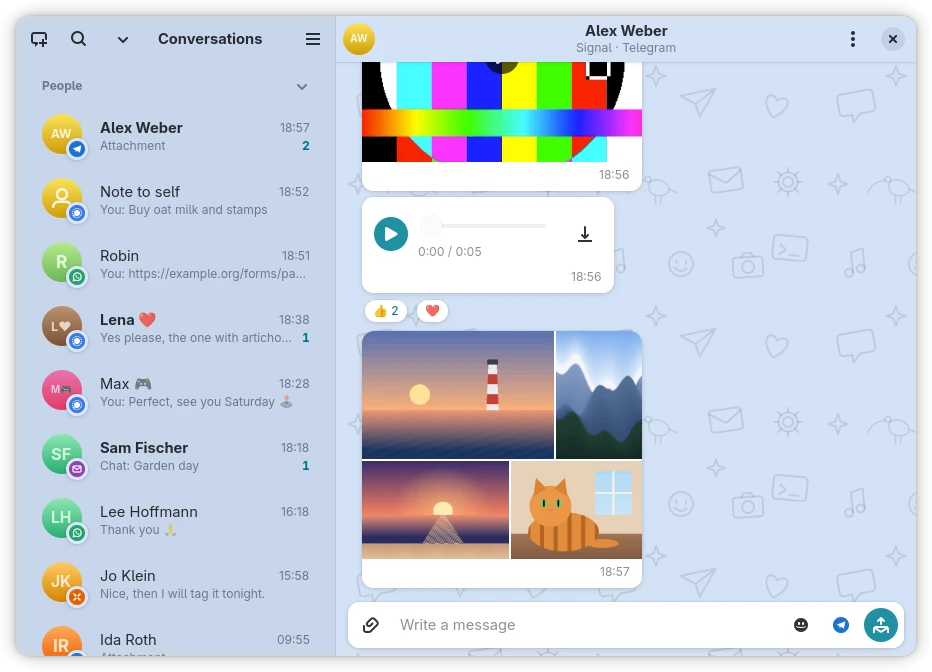
Version 0.2.0 is out today, the first public release. Downloads are on the app page.
What it does
- One list for mail, Matrix, XMPP, Signal, Telegram and WhatsApp. A person you reach on several messengers is one contact, with a default messenger you can change.
- Pictures, videos, voice messages and files in both directions, the same way on every protocol, with reactions, edits, deletions and replies where the chat supports them.
- One search across all chats and mail.
- Email chats: mail threads that carry the
Chat-Versionheader show as chats in the style of Delta Chat. - A background service keeps receiving while the window is closed, so Signal and WhatsApp, which keep no archive on the server, don't lose a message.
- Everything in the window. A welcome screen walks through protocols and accounts; nothing needs the command line.
Your messages stay yours
Curlew keeps its index on your machine. AI assistants can work with your messages through an MCP server, but only after you turn that on, and then only for the accounts and contacts you allow. AI and read receipts are off by default.
Early days
This is an early version, and some edges show:
- Signal, WhatsApp and XMPP groups can be read but not written to yet. Telegram and Matrix groups can.
- Matrix sends into unencrypted rooms only; encrypted rooms are read.
- WhatsApp and Signal access goes through unofficial clients. Curlew shows their terms before you turn them on.
- Linux comes first (Flatpak,
.deb,.rpm). macOS and Windows builds are a preview with chat only.
What's next
- Writing in group chats on every protocol
- An Unread section to work through, and favourites marked with a star
- Muting chats and people, synced with the messenger
- Mentions that reach you even in a muted group
- Recording voice messages right in the composer
- Sent pictures that show at once, before the server confirms them
- Later: calls
Why a curlew
Pidgin, the messenger I used for years, had a pigeon as its mascot. Curlew follows it with another bird: the curlew, with its long curved beak, which I find endearing and which makes a clear mark for an icon. Its call carries far across moors and mudflats, and a call that reaches far felt like the right image for a messenger that speaks many protocols.
Under the hood
Curlew is written in TypeScript with GTK 4 and libadwaita and runs on GJS, built with gjsify. On macOS and Windows the same code runs on Node.js through @gjsify/node-gi. The source is on GitHub under the AGPL.
If you try it, I'd like to hear how it goes, best as an issue on GitHub.